
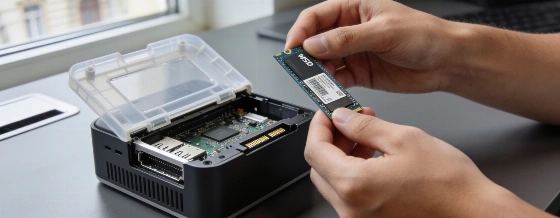
The Acemagic K1 looks like a strong value on paper, but its sluggish SATA SSD keeps it from reaching its potential. Swapping in an NVMe drive turns this mini PC into a much more capable office machine.
The Acemagic K1 is a classic case of good hardware held back by a single weak link. On specs alone, it should be a budget standout: Ryzen 5 7530U, 16GB dual-channel LPDDR4/LPDDR4X RAM, and support for three 4K displays, all for about 340 euro. But in daily use, the slow SATA SSD drags down the whole experience. Windows and apps feel less responsive than you'd expect from the hardware. The K1 comes in several versions, including one with a Ryzen Embedded R2544, 8GB DDR4, and a 256GB M.2 SATA SSD. Officially, storage can be expanded up to 4TB.
The bottleneck is obvious. In CPU benchmarks, the K1 actually edges out the Geekom A5 Pro, which uses the same Ryzen chip. It scores 4,183 points in the 3DMark CPU Profile at max threads, beating both the A5 Pro and the Nipogi E3B. But the SATA SSD is slow-494MB/s read and 428MB/s write-while the A5 Pro's NVMe drive hits 3,752MB/s read. The result: app launches and file access are noticeably slower, and the K1's PCMark 10 Productivity score falls behind. This storage issue comes up again and again in independent reviews, where the SATA drive is called out as the main drawback compared to NVMe-equipped competitors.
Unboxing: plastic, but practical
The K1 arrives as a compact matte plastic box, 128 x 128 x 41mm-slightly bigger than the typical 4x4-inch mini PC, but still easy to tuck behind a monitor. The build is tidy, with even seams and no sharp edges, but the hollow feel and lack of metal remind you it's a budget device. Ports are generous: six USB-A, one USB-C, HDMI 2.0, DisplayPort 1.4b, and Gigabit LAN. Three 4K displays at 60Hz are supported out of the box, and a VESA mount is included for flexible placement. Recent retail listings confirm support for three 4K displays via HDMI, DisplayPort, and USB-C.
Getting inside takes some patience. You have to peel off the rubber feet to reach the screws, and the USB ports are so snug that thicker sticks need a bit of force. Inside, there's 16GB of soldered LPDDR4X RAM-fast enough for office work and light graphics, but not upgradable. The K1 does have two M.2-2280 slots, with one supporting NVMe. This is the key upgrade for anyone who wants better performance. Wireless is up to date, with Wi-Fi 6 and Bluetooth 5.2, and the system runs on a 65-watt adapter.
В сопутствующих подборках мини-ПК K1 регулярно описывается как бюджетная модель с упором на офисные задачи и мультимониторность; при этом критика в независимых обзорах повторяется вокруг SATA-накопителя как главного ограничения производительности по сравнению с NVMe-решениями.
- Mercury PC, Tech Review Aggregator
Ryzen power, storage slowdown
The Ryzen 5 7530U inside the K1 is a 6-core, 12-thread Zen 3 chip (CPU ID 100-000000943) with a 2.0GHz base and 4.5GHz boost, built on a 7nm process. It's paired with integrated Radeon Vega graphics, which are fine for office work, video, and basic image editing. The processor runs at 28W TDP (PL1) and can briefly boost to 35W (PL2), with a max temperature of 100°C. Gaming is limited to older or lightweight titles, and AI workloads are modest-Geekbench AI scores match the A5 Pro, but don't come close to what newer NPUs or dedicated GPUs can do.
Where the K1 does well is energy use. Idle power draw is about 5 watts, and even under full load, it never goes above 38 watts. That makes it a good fit for always-on roles like media centers or home servers. The included 65-watt power supply is more than enough.
Noise and networking
The cooling system is less subtle. The fan is quiet at idle (28dB), but ramps up quickly under load, reaching 35-40dB-noticeable in a quiet room. The Geekom A5 Pro is quieter in similar situations. On networking, the K1 sticks with Gigabit LAN and Wi-Fi 6, skipping the faster 2.5Gbit LAN and Wi-Fi 6E found in pricier models. For users in Italy, the K1's wireless modules meet current EU and AGCOM spectrum rules, but don't support Wi-Fi 7. For more on Italian wireless compliance, see the AGCOM regulatory archive.
Software setup is straightforward: the K1 ships with Windows 11 Pro 25H2 (Build 26200) and a recent BIOS, so only minor updates are needed. Many competitors require a long round of updates before you can get started.
Who it's for-and who should skip it
If you want a low-cost, energy-efficient mini PC for office, home office, or media use, the K1 is a solid pick-as long as you're willing to swap in a fast NVMe SSD. The soldered RAM is a permanent limit, but 16GB is enough for most non-creative workloads. If you want a metal case, faster networking, or better graphics, look elsewhere; the Geekom A5 Pro and other models offer a more complete package. For a broader look at mini PC trends, see our recent analysis of the GEEKOM IT13 MAX.
The real story with the Acemagic K1 is how much it improves with a simple NVMe upgrade. Out of the box, it's held back by a slow SATA SSD-a clear cost-saving move by the manufacturer. But if you're willing to spend a little extra and do the upgrade yourself, the K1 becomes a much more responsive and capable machine. For buyers who want something that just works from the start, the K1's compromises are hard to overlook, especially with so many rivals that don't need fixing to deliver good performance.