
The ASUS ProArt P16 offers creative professionals a serious mobile workstation, pairing a high-end OLED display, AMD Ryzen AI processors, and NVIDIA RTX 50-series graphics for demanding photo and video editing on the go.
Photographers and videographers who have spent years working around slow laptops and a tangle of adapters will find the ASUS ProArt P16 a welcome change. This isn't just another spec-heavy machine-it's ASUS's answer to the idea that real creative power only lives on the desktop. With options up to an RTX 5090 Laptop GPU and a 4K OLED touchscreen, the ProArt P16 is built for professionals who need top-tier performance wherever they work.
What makes the ProArt P16 stand out isn't just its speed, but the way it brings together features that matter in practice. There's a full-sized SD Express 7.0 card reader, up to 64GB of LPDDR5X RAM, and up to 2TB of PCIe 4.0 SSD storage. The OLED display covers 100% of the DCI-P3 color space and is Pantone validated, offering the kind of color accuracy and contrast photographers and editors have wanted in a portable device.
Display and build quality: focused on the essentials
ASUS has left out the flashy lights and oversized vents you see on gaming laptops. The ProArt P16's Nano Black chassis is understated, measuring just 12.9 mm thick and weighing 1.77 kg-14% thinner and 9% lighter than the previous version, according to ASUS at IFA 2026. The highlight is the ASUS Lumina Pro OLED panel, available in 3K or 4K. Top models offer 3840 × 2400 resolution at 120Hz, support for VRR and NVIDIA G-SYNC, and up to 1,600 nits HDR peak brightness. Independent tests show near-complete coverage of sRGB, Adobe RGB, and DCI-P3 gamuts, making this display a strong choice for color-critical work.
Photographers will notice the deep blacks and vivid colors that OLED delivers. Editing concert photos, portraits, or high-contrast scenes is a noticeably better experience. For video editors, the 16:10 aspect ratio and accurate color make grading and timeline work easier. The main drawback: the glossy touchscreen can reflect light outdoors, though ASUS has improved the anti-reflection coating on newer models.
ASUS confirms that the ProArt P16 features a 99 Wh battery, ASUS Lumina Pro OLED display with Delta E < 1, and up to 128 GB unified memory in the 2026 ProArt lineup, targeting creators who demand both mobility and AI-powered performance.
Performance: desktop-class power you can carry
The ProArt P16 is a portable studio. The 2026 update brings AMD Ryzen AI 9 HX 370 processors and NVIDIA RTX 4060, 5070, or 5090 Laptop GPUs, with up to 64GB LPDDR5X RAM and 2TB PCIe 4.0 SSD. Benchmarks back this up: an RTX 5070 model scores 8,841 in PugetBench Photoshop, 10,488 in Premiere Pro, and 7,355 in DaVinci Resolve, beating previous generations by 10-15% in graphics-heavy tasks. In real use, Lightroom imports and previews are quick, Photoshop handles large layered files smoothly, and Premiere Pro or DaVinci Resolve can manage 4K and even 8K timelines without lag.
For those working in Adobe's suite, the ProArt P16 is a major step up. AI features in Lightroom and Photoshop benefit from the NVIDIA GPU, and video editors get hardware-accelerated workflows for 10-bit 4:2:2 video and AV1 encoding. DaVinci Resolve users should look for models with 12GB or 16GB VRAM for heavy Fusion, AI effects, or 8K projects.
Connectivity and real-world usability
ASUS has finally addressed the dongle problem. The ProArt P16 includes USB4, USB-C, two USB-A ports, HDMI 2.1, an audio jack, and Wi-Fi 7 for fast wireless connections. The SD Express reader is especially useful for photographers, though CFexpress users will still need an external reader. There's no Ethernet port, which may bother some, but most creative professionals will find the port selection a relief compared to other laptops.
The ASUS DialPad, built into the touchpad, is programmable for tasks like adjusting brush sizes in Photoshop or scrubbing timelines in Premiere. It's not essential, but once set up, it can speed up certain workflows. Stylus support on the touchscreen is handy for quick edits or mask painting, though it won't replace a dedicated tablet for detailed retouching.
Battery, cooling, and portability: what to expect
All this power comes with some trade-offs. The 99 Wh battery, confirmed for the 2026 ProArt P16, gives four to six hours of use depending on how you work-reasonable for a machine like this, but not enough for a full day away from a charger. Heavy video exports or GPU tasks will drain the battery faster. USB-C Power Delivery up to 100W makes it easier to travel light, but only the full ASUS charger unlocks the laptop's maximum performance.
Cooling is effective but can get loud. Under heavy load, fan noise can reach 45dBA in Performance mode, but Standard mode is quieter and still fast enough for most photo editing. For big exports, it's worth letting the fans run at full speed.
Who should consider the ProArt P16?
Photographers using Lightroom and Photoshop will do well with the RTX 4060, 32GB RAM, and 1-2TB SSD. Those editing video should look at the RTX 5070 with 64GB RAM and 2TB SSD for a balanced setup. Professional video editors or those working in 8K, VFX, or 3D should consider the RTX 5070 Ti or 5080 with 64GB RAM and up to 2TB SSD. The RTX 5090 is only necessary for the most demanding workflows-and if the budget allows.
Compared to the MacBook Pro, the ProArt P16 offers NVIDIA CUDA acceleration, a touchscreen, the DialPad, and more ports. Apple still leads in battery life and ecosystem integration, but for those who need maximum GPU power and Windows flexibility, ASUS has built a strong alternative.
Strengths and weaknesses in practice
The ProArt P16's strengths are clear: an excellent OLED display, high-end CPU and GPU options, plenty of RAM and storage, and a port selection that fits creative work. The SD Express reader is a practical addition for photographers. Build quality is solid, and the design is understated enough for any professional setting. On the downside, battery life is average, high-performance modes can get noisy, and the lack of built-in Ethernet or CFexpress support may be a drawback for some. RAM can't be upgraded after purchase, so it's worth choosing carefully at the start.
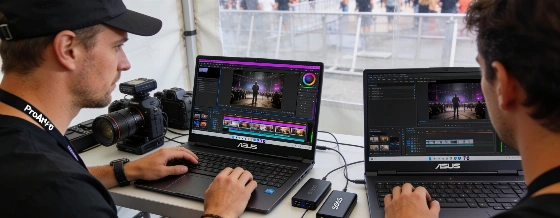
For event and festival photographers, the P16 can handle thousands of RAW files, run heavy noise reduction, and deliver galleries quickly. Videographers will benefit from GPU acceleration for multicam edits, motion graphics, and AI effects. The range of configurations means you can pick what fits your workflow without overspending on specs you don't need.
ASUS has finally built a Windows laptop that doesn't force creative professionals to choose between power, portability, and usability. The ProArt P16 isn't cheap, but it's a real mobile workstation that can replace a desktop for many users. The OLED display is a pleasure to use, the hardware is uncompromising, and the design choices show a clear understanding of what creative professionals need. For those who want serious editing power away from the studio, this machine sets a new standard.