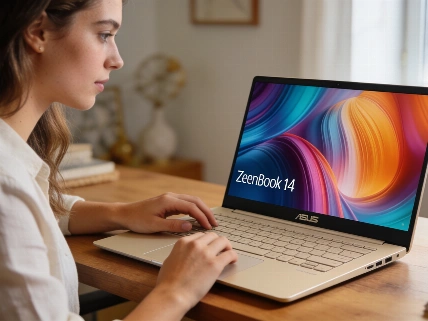

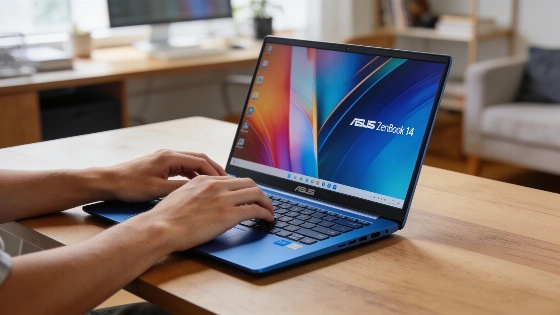
The Asus Zenbook 14 stands out for its ultra-light body and bright OLED display, but its AED 4,999 price is hard to swallow when faster laptops like the MacBook Air M5 are just a bit more expensive.
Pick up the Zenbook 14 and you barely feel it. At 1.1kg, it almost disappears in your bag. The Ceraluminum chassis and Arctic Blue finish look sharp. They shrug off fingerprints and scratches, even if you treat the laptop carelessly. But then you see the AED 4,999 price. That's when things get complicated. The 13" MacBook Air M5 with 16GB RAM and a 512GB SSD costs just AED 500 more. It's faster and lasts longer on a charge.
Asus nailed the feel. The Zenbook 14 is easy to hold. The keyboard is a highlight. Keys are spaced well, have good travel, and make a soft, satisfying sound. Typing for hours is no chore. The OLED display (1920×1200) pops with color and deep blacks. Everyday work and videos look great. But the 60Hz refresh rate is a letdown. At this price, many expect 120Hz. Once you've used a faster screen, 60Hz feels slow.
Design e materiali: la leggerezza senza compromessi?
The Ceraluminum build isn't just a marketing line. It feels warm, not cold like most metal laptops. Smudges don't stick. The chassis stays stiff. No flex around the keyboard or lid. The hinge opens smoothly with one finger. At just over a kilo, you forget it's in your bag. That changes when you use the trackpad.
La linea Zenbook 14 (UX3480) è presentata come Copilot+ PC con Snapdragon X, Windows 11 Pro, display OLED FHD, 16 GB LPDDR5x, SSD fino a 512 GB e batteria da 50 Wh, posizionandosi come soluzione premium per mobilità e materiali avanzati.
The trackpad is a miss. It's a mechanical diving-board style. Tracking is off, especially for small movements. Only the bottom part clicks well. After using haptic touchpads on other Windows laptops and MacBooks, this one feels old. It drags down the premium feel.
Ports are practical. Two USB-C, one USB-A, HDMI, and a headphone jack. Both USB-C ports sit on the same side. That limits how you charge. Still, for most work, the setup works.
Display OLED e prestazioni: dove si ferma la corsa
The OLED screen is sharp and colorful. But the 60Hz limit stands out. Scrolling and moving windows don't feel as smooth as on 120Hz panels. You notice it right away if you've used faster screens. Speakers and webcam do the job. They're clear enough for calls and videos, but nothing special.
Inside, the Snapdragon X X1-26-100 and 16GB RAM keep Windows running smoothly for daily tasks. Apps open fast. Multitasking is quick. Battery drain during sleep is low. In normal use, expect 6-7 hours per charge. That covers most workdays. It's less than the 9-12 hours Qualcomm claims for Snapdragon X. The MacBook Air M5 lasts 11-12 hours in similar use. That's a big gap for a small price difference.
Benchmarks tell the story. Geekbench 7 gives the Zenbook 14 a single-core score of 1,855 and a multi-core of 11,304. The Adreno GPU falls behind in 3DMark. The Acer Aspire 14 with Intel Core Ultra 7 155U, as shown in our earlier breakdown, beats the Zenbook's GPU for less money. The MacBook Air M5's GPU scores over four times higher in Steel Nomad Light. That's a huge difference for just a bit more cash.
Esperienza d'uso e limiti reali
Even with modest specs, the Zenbook 14 feels quick for web, office work, streaming, and light photo edits. Windows on ARM is no longer a headache. Standard apps install and run fine. But try video editing, 3D work, or modern games, and the Snapdragon X hits a wall. The Adreno GPU isn't made for heavy graphics. Even older or indie games need lower settings.
Thermals are handled well. The chassis gets warm under load but never hot. Fans stay quiet. You only hear them if you put your ear to the keyboard. Standby is another win. Close the lid and battery drain is almost zero. Wake is instant.
Vale la pena spendere per il Zenbook 14?
The Zenbook 14 shines for its light, tough build, great keyboard, vivid OLED, and battery that lasts a full workday. But at AED 4,999, these strengths are hard to justify. The MacBook Air M5 is close in price but much faster and lasts longer. Asus gives you more ports and a finish that hides fingerprints. But if you want speed or a smoother display, the Zenbook's tradeoffs are tough to accept.
Asus built a laptop that's easy to carry and feels good to use. But at this price, the market is brutal. Unless you care most about weight, build, and OLED visuals-and can live with an old-school trackpad and basic performance-the Zenbook 14 is a hard sell. For those who put feel and looks first, it's still tempting. But it's not cheap.