
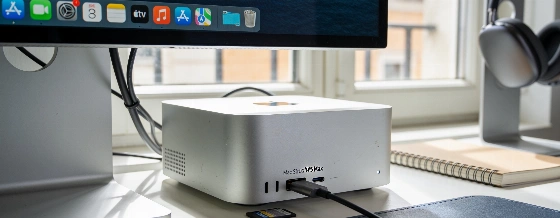
The Mac Studio M5 Max is more than a creative workstation. With 128GB of unified memory, it runs huge language models locally and beats rivals in tough offline AI tasks.
Running a 65GB, 120-billion-parameter language model offline on a desktop Mac used to sound impossible. The Mac Studio M5 Max does it with ease. It handles a full agentic workflow, works with a 64K context window, and pulls data from a 16-page PDF in less than a minute. All of this happens with no internet connection. This isn't just a small step forward. It's a big change in what a compact desktop can do for local AI.
Apple built the new Mac Studio M5 Max to erase the line between creative workstations and AI development machines. It comes with an 18-core CPU (six Super cores, twelve Performance cores), a 40-core GPU, 128GB of unified memory, and an 8TB SSD. This setup is for people who need more than fast exports or smooth gaming. It's made to run large language models locally, with no shortcuts. Independent retailers list the M5 Max in several versions: 64GB RAM with 1TB SSD, and a 36GB/512GB option. Pre-orders and deliveries start from 22 September 2026 in Europe and Switzerland, according to LDLC.
Unmatched local AI performance
The M6 Mac mini is strong for daily office and creative work. But the M5 Max Studio with 128GB of memory is in another class for AI. It loads and runs models like Qwen3 4B and 30B at higher token rates than the M6 mini. It can even handle a 4-bit Llama 3.3 70B model, which uses up to 41.2GB of memory. The Studio's GPU and memory bandwidth-up to 614GB/s in the top model, with entry-level versions at 460GB/s-make it much faster for GPU-heavy and local LLM jobs. The M5 Max chip comes in several versions, including a 32-core GPU with 36GB RAM. This matters for performance tests, since not all benchmarks use the same model.
In direct tests, the M5 Max beats the M6 Mac mini by 54% in multicore performance and scores 2.7 times higher in Metal. Real-world creative tests show the same gap. A 4K60 H.264 export in DaVinci Resolve finishes 36% faster. Cyberpunk 2077 runs at an average of 193.67 fps, more than double the M6 mini's result. SSD speeds are just as strong, with writes at 16,042.8 MB/s and reads at 13,375.9 MB/s in the 8TB version.
Mac Studio M5 Max è progettato per carichi AI locali avanzati, grazie a 128GB di memoria unificata e una bandwidth che raggiunge i 614GB/s, rendendolo una scelta di riferimento per professionisti che lavorano con modelli linguistici di grandi dimensioni senza connessione cloud.
Quiet, efficient, and well connected
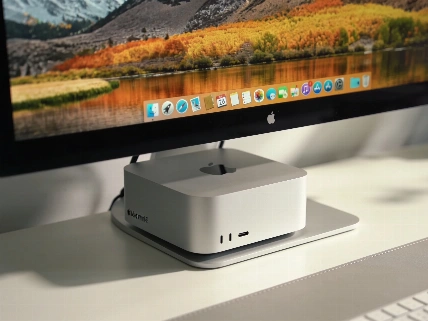
Even with all this power, the Mac Studio stays quiet and cool. Under heavy AI loads that peak at 174W, the fan can't be heard from a normal desk. Up close, it's only a faint sound. The aluminum case fits neatly under a Studio Display. The front USB-C ports and SDXC slot make quick transfers and charging easy. On the back, you get four Thunderbolt 5 ports, 10Gb Ethernet, HDMI 2.1, a headphone jack, and two USB-A ports. That's enough for any pro setup.
Setup is simple. Plug it in, power up, and it's ready for tough jobs. The case stays cold, even when running big models or exporting high-res video.
Offline AI and how it stacks up
The real difference with the M5 Max Studio is its offline AI muscle. With OpenClaw and Ollama, it ran a 120B parameter model and pulled technical specs from a long PDF in just 49 seconds, all without internet. In direct tests against the Nvidia DGX Spark ASUS GX10, the Mac Studio beat the GX10 on every Ollama model, including the huge 65GB GPT-OSS 120B. It also matches the GX10's price in the UAE. The M5 Max 40-core GPU version starts at $2,499. The top M5 Ultra goes up to $5,499. That sets the price range for the 2026 Mac Studio line.
This jump in local AI isn't happening in a vacuum. More compact AI workstations are coming, like the GMKtec EVO-X3, which we covered earlier. But Apple's mix of hardware, memory, and cooling in the Mac Studio M5 Max raises the bar for what a desktop can do.
Who really needs the Mac Studio M5 Max?
If you mostly do office work, browse the web, or handle light creative projects, the M6 Mac mini is still the smart, affordable pick. The Mac Studio M5 Max is worth the extra cost only if you need its extra CPU cores, 40-core GPU, and huge memory. If your work means running big AI models locally, doing GPU-heavy creative jobs, or you want one machine for both AI and workstation tasks, the Studio is the clear winner.
If your needs are smaller-basic models, plug-and-play AI, or you want the 8TB version just for speed-the price may not be worth it. The 128GB/1TB version is the best balance for local AI without going overboard.
Apple has built a machine that's not just fast, but changes what's possible for local AI. The Mac Studio M5 Max's memory, GPU, and quiet efficiency make it the top pick for pros who want to run big models offline and need a desktop that never gets hot or loud. In a market where most desktops still struggle to balance power and real-world use, this Studio stands apart.