
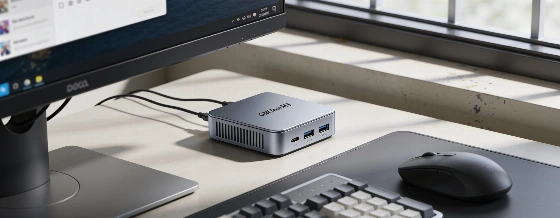
GMKtec M3 Pro changes what you can expect from a mini PC. It runs local AI models and juggles real work on a 12-core Intel chip, all in a box that disappears behind your screen. Here's how it holds up in daily work and AI tests.
Summing up a five-page PDF with a local AI model in just 13 seconds-on a PC that fits in your palm-was not something I expected in 2024. But that's what the GMKtec M3 Pro did. It runs language models and even creates images, all without sending your data to the cloud. If you care about privacy or want to try AI on your own hardware, this is a big step forward.
The M3 Pro doesn't just dabble in local AI. It comes with a full suite for running language models, image analysis, voice transcription, and more, all on the device. There's a catch: no NPU, no dedicated GPU, and DDR4-3200 memory that's a step behind the latest. Still, the Core i5-13500H packs 12 cores and 16 threads, with 16 GB of RAM and a 512 GB NVMe SSD. The whole thing weighs just 430 grams and measures 114 x 106 x 42.5 mm. Official retail listings confirm this setup is built for multitasking and local AI, not for high-end gaming or advanced neural processing.
Local AI performance and real multitasking
Benchmarks are clear: 2,352 points single-core and 9,296 multi-core in Geekbench, 5,999 in PCMark 10, and 13,517 in Geekbench OpenCL. These scores put the M3 Pro ahead of older mini PCs like the GMKtec G11, and even some Core i7-1360P systems. In daily use, Windows 11 Pro feels fast. You can open lots of browser tabs with no slowdown, and productivity apps launch right away. The Iris Xe graphics are the weak spot for anything more than light gaming or video editing. Expect 20 FPS in Cyberpunk 2077 at 1080p, but smooth 4K60 YouTube playback and good results in older or indie games.
The real surprise is AI. With the pre-installed suite, I ran models like Gemma 3 1B, Qwen2.5 1.5B, and Llama 3.2 1B. They summarized documents in under 20 seconds. Even Phi-4, a bigger model, finished a PDF summary in 45 seconds and did a detailed image analysis in under 90 seconds. You can generate images too, but it's slow-about 7 minutes per image. The limit is clear: with only 16 GB of RAM and no dedicated VRAM, bigger models like Mistral Small 3.1 24B won't load. You can upgrade to 32 or 64 GB of RAM for heavier AI work, but don't expect miracles from the Iris Xe or DDR4 memory speed.
GMKtec M3 Pro is built around the Intel Core i5-13500H, offering up to 16 GB RAM and 1 TB SSD in its standard retail configurations, with Windows 11 Pro pre-installed. This positions it as a compact multitasking PC rather than a dedicated AI accelerator.
Upgrade options and strong connectivity (with one gap)
Unlike many new mini PCs, the M3 Pro is easy to upgrade. Two SO-DIMM slots let you go up to 64 GB of DDR4-3200. There are two M.2 SSD slots (one 2280 PCIe 4.0 x4, one 2242 PCIe 3.0 x4/SATA), each supporting up to 8 TB. This makes it a good fit for Proxmox, Docker, or Home Assistant-one SSD for the system, another for VMs or containers. You get 2.5 GbE Ethernet (Intel i226), Wi-Fi 6, and Bluetooth 5.2. It can run three 4K displays at once. The only real miss is USB4/Thunderbolt, so you can't add an eGPU later. For most desktop, server, or home automation uses, this won't matter, but it's a roadblock for gamers who want to upgrade graphics.
Cooling is handled by three BIOS power profiles: Silent (28 W), Balanced (35 W), and Performance (up to 45 W). Under heavy load, CPU and GPU temps stay between 70 and 85 °C. The fan stays quiet-no hair dryer noise. Power use ranges from 10-11 W at idle to 75 W under stress, so it's efficient enough for 24/7 use.
A PC that fits any role
For classic productivity, the M3 Pro is more than enough. Heavy web browsing, Office, photo editing, video calls, programming, and 4K video playback all run smoothly. The Iris Xe's hardware decoder handles 4K60 streaming with no issues. Light video editing works, but GPU-heavy effects show the system's limits fast. As a home server, it's a big step up from the G11, with more CPU power and RAM, though the single Ethernet port means the G11 still has an edge for network appliance jobs.
When you compare the M3 Pro to other compact powerhouses like the AtomMan G7 Pro reported earlier, it's clear GMKtec is aiming at a different crowd: people who want strong multitasking, local AI, and server flexibility in a small, affordable box-not just raw gaming power.
The real value: private AI and solid performance
The M3 Pro stands out because it can run real AI workloads locally, with no cloud needed. For professionals working with confidential files, this is a big deal. Summarizing, translating, or searching private data with small LLMs is not just possible-it's practical. For heavier AI or AAA gaming, the older hardware and lack of a dedicated GPU are limits. But for office work, development, media, home automation, Docker, Proxmox, or as a family PC, the M3 Pro is a strong alternative to a regular desktop-especially at under €450 direct from the maker (Amazon lists it at €569).
GMKtec's choice to use a slightly older platform works. The Core i5-13500H may not have the latest AI accelerators, but it still delivers for most users. The M3 Pro's mix of upgrade options, connectivity, and local AI support makes it one of the most flexible mini PCs out there. If you want a small, fast machine that can handle real work and private AI tasks without costing a fortune, this is the mini PC to watch. For those chasing the latest AI hardware, GMKtec has already announced the EVO-X5 Pro, which will offer up to 192 GB unified memory and support for local LLMs up to 300B parameters. This shows the industry is moving toward more powerful APU-based solutions for on-device AI. You can find more details on this next-gen model in the Notebookcheck global launch coverage.